
Switch to SubtleForms without starting over
Bring your forms from Contact Form 7, Gravity Forms, Fluent Forms, WPForms or Ninja Forms, and your entries from WPForms and Ninja Forms. Forms arrive as drafts, your originals stay exactly as they are, and a report tells you what to check.
Your forms today
Contact Form 7
Gravity Forms
Fluent Forms
WPForms
Ninja Forms

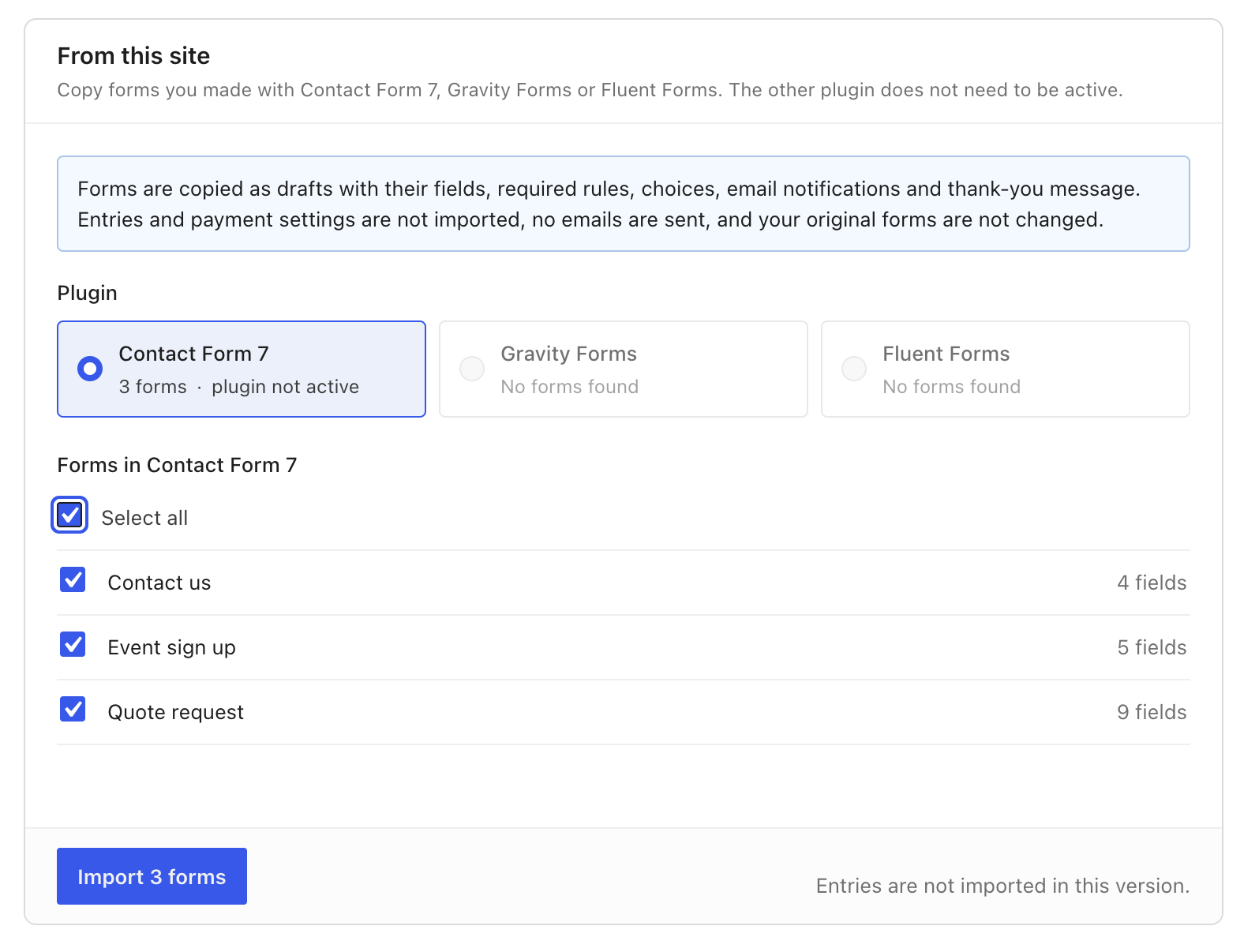
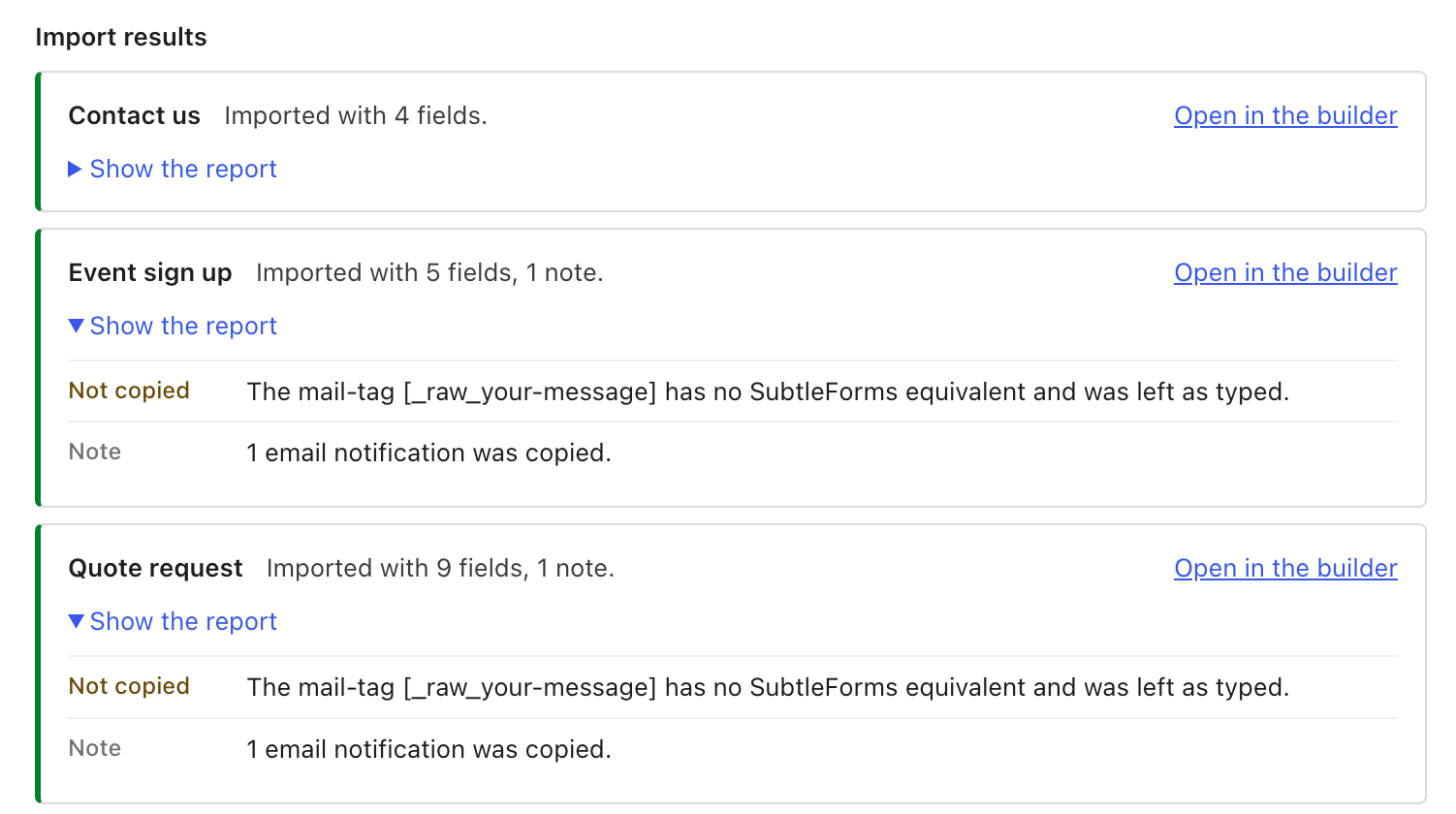
The real Migrate screen in SubtleForms › Settings › Tools, importing three Contact Form 7 forms.

The real Migrate screen, no mock up
It finds your forms for you
Install SubtleForms on a site that already has forms. If you have not built a SubtleForms form yet and it finds forms from another plugin, it offers to bring them across. Say Not now and it asks again later, or open Settings › Tools › Migrate whenever you are ready.
- Works when the old plugin is switched off: its forms are still found
- Export files work too: Gravity Forms, Fluent Forms and WPForms JSON, and Ninja Forms .nff files
- Forminator and SureForms forms are recognised, though they cannot be imported yet
Import your existing forms?
SubtleForms found forms from other plugins on this site. Import creates SubtleForms drafts. The originals are only read.
Import forms
Not now
Shown when SubtleForms finds forms
Three steps
Most of the time goes on step three: reading the report and pressing publish.
1
Install SubtleForms
The free plugin from WordPress.org. Migration is part of it, no license needed.
2
Open Migrate
Accept the offer, or go to SubtleForms › Settings › Tools › Migrate. Pick the plugin and tick the forms.
3
Check and publish
Read each form’s report, adjust anything marked Changed, then publish and swap the block or shortcode on your pages.
What comes across, and what you set up again
No surprises. The report lists every difference, form by form.
Comes across
- Every form you pick, as a SubtleForms draft
- Its fields, required rules and choices
- Its email notifications and thank-you message or redirect
- Conditional logic that fits SubtleForms rules (WPForms and Ninja Forms)
- Entries from WPForms and Ninja Forms, only if you tick the box
- A report for each form, listing anything not copied
Set up again
- Entries from Contact Form 7, Gravity Forms and Fluent Forms
- Uploaded files: their address is kept as text
- Payment fields and settings
- Captcha: SubtleForms has its own spam protection
- Quiz, poll, signature and repeater fields, schedules and entry limits
Safe by design
Originals are only read
Nothing is written to the other plugin’s forms or tables. Your live forms keep working while you check the drafts.
Drafts until you say so
Imported forms are drafts. Nothing appears on your site until you publish it.
Asks before importing twice
SubtleForms remembers what it imported. Importing the same form again makes a clearly named copy, only if you ask.
Batches you can follow
Up to 20 forms per run, with progress shown as it goes. Run it again for the rest.
Switching questions
Still unsure? Ask us anything.
Do I lose my entries?
No. From WPForms and Ninja Forms you can bring entries across: tick the box, which is off by default because entries hold personal data. They keep their dates, arrive in batches of 200, and a second run skips the ones already copied. Entries from Contact Form 7, Gravity Forms and Fluent Forms stay in the old plugin.
Does the old plugin have to be active?
No. SubtleForms finds the forms as long as they are still in your database, even with the old plugin switched off.
Will my live forms change?
No. The originals are only read. Your pages keep showing the old forms until you swap in the SubtleForms block or shortcode.
Can I import from WPForms or Ninja Forms?
Yes, forms and entries. Forminator and SureForms forms are recognised on your site but cannot be imported yet.
Do I need a paid plan to migrate?
No. Migration is part of the free plugin.
I have hundreds of forms. Will it cope?
Yes, in batches of up to 20 forms per run. Pick the next batch and run it again.
Bring your forms to SubtleForms
Start a 7-day free trial, or begin with the free version on WordPress.org.
7 days, card required. 14-day money-back guarantee.